-1.jpg?width=276&height=100&name=APPA%20Logo%20R%204c%20(1)-1.jpg)
Please note: Only APPA Members can download our reports.
Steps for disabling the Global Object Security Policy
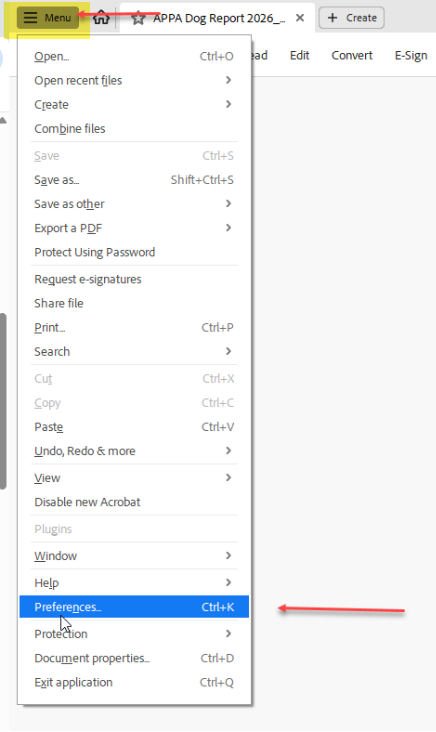
- In Adobe PDF Reader or Adobe Acrobat, go to Menu > Edit > Preferences
- Click the JavaScript tab, then De-select (uncheck) the "global object security policy" field and click OK.
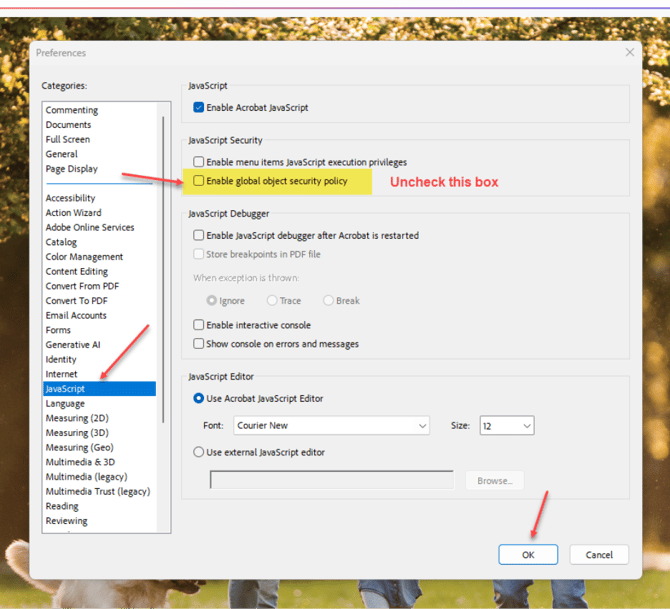
Users will only need to do this once per computer. If they wish to open the protected PDF file on a 2nd computer, then they will need to disable the GOS policy in Adobe on the other computer as well.
Why this needs to be disabled:
The Global Object Security (GOS) policy is a setting in Adobe Reader and Adobe Acrobat that controls how cookies in Adobe products behave. The default setting is to "enable global object security policy" which means that every time someone renames a file or moves a file to a different location, a different cookie is created each time. Our content security solution stores the cookie to ensure the file can be opened on that device without having the user to re-download the content every time.